• Latest
Instagram Link Email to Receive Payment Scam Explained for Online Sellers

Instagram Link Email to Receive Payment Scam Explained for Online Sellers

November 4, 2026
What Is Smishing? How SMS Phishing Puts eCommerce Merchants at Risk

What Is Smishing? How SMS Phishing Puts eCommerce Merchants at Risk

November 3, 2026
Two wooden blocks on a desk, one showing a shield-and-padlock icon and the other reading “FRAUD DETECTION,” with a hand holding a magnifying glass over a digital screen displaying a red warning triangle and the word “FRAUD” against a binary-code background; a laptop, notebook, and pen are visible in the background.

PYMNTS Survey Finds Stark AI Fraud Detection Adoption Gap Among Finance Teams

November 3, 2026
A miniature shopping cart holding small paper shopping bags sits on a wooden desk beside a tabletop sign reading “REFUND” with a circular arrow icon, while a person in the background holds a paper shopping bag and reviews a printed receipt.

Ravelin Survey Finds 27% of Shoppers Admit to Refund Abuse, Calls Them “Refundjackers”

November 3, 2026
A gavel resting on a sound block beside brass scales of justice, with a document in the foreground titled “Proposed Settlement, Federal Trade Commission and Washington State,” and a pen lying across the page.

FTC, Washington State Announce Proposed Settlement With Payment Processor Over Hidden Fees, Hard-to-Cancel Contracts

November 3, 2026
Stock photo of a TransUnion sign beside wooden blocks with person icons and a block reading “$2.4B Exposure,” with a magnifying glass showing a hooded figure and a warning triangle overlaid on blurred ID photos, illustrating a data breach affecting TransUnion customers.

TransUnion Finds $2.4B in Synthetic Identity Fraud Exposure as Fraud Shifts to Login and Transaction Stages

November 2, 2026
Stock photo of the Akamai logo mounted on an office building exterior, with greenery in the foreground.

Akamai Finds 1,200+ Lookalike Shopping Domains and Rising Account Creation Fraud

November 2, 2026
Stock photo of a handcuffed man being escorted by two police officers in tactical vests, viewed from behind, outside a building.

Singapore Police Arrest Three Men Over Stolen Card Details Used to Buy High-End Electronics

October 30, 2026
Stock photo of a hand tapping a contactless credit card against a payment terminal at a café counter, with a coffee cup and pastry display in the background.

BBB Warns Shoppers That ‘Ghost Tapping’ Scams Are Overcharging Tap-to-Pay Cards

October 30, 2026
Stock photo of three wooden blocks with icons of a person, padlock, and checkmark shield, beside a small Canadian flag and a document titled “Fraud Prevention” with a pie chart, on a desk.

Account Login Fraud Drives Largest Share of Suspected Digital Fraud in Canada, says TransUnion

October 29, 2026
Stock photo of a woman sitting on a couch with her head resting in her hand, appearing distressed, in a dimly lit living room.

General-Consumer Scam Victims Report Far Higher Suicidal Ideation Than Identity Theft Victims

October 29, 2026
Stock photo of shopping bags labeled “Black Friday” and a “Cyber Monday” card with a shopping cart icon, beside wrapped gift boxes on a wooden table, illustrating holiday shopping sales.

Infobip Predicts 7.3 Billion Black Friday and Cyber Monday Interactions for 2026

October 28, 2026
Stock photo of a woman holding a smartphone to photograph or scan an empty, damaged cardboard box at a table, illustrating documentation of a missing or damaged package delivery.

Retailers Catch Shoppers Using AI-Generated Photos To Fake Damage Claims

October 28, 2026
  • Contribute
  • Contact Us
  • About
  • Join Us
  • Advertise
Wednesday, November 4, 2026
Merchant Fraud Journal
ADVERTISEMENT
  • Home
  • Articles
    • Chargebacks
    • Fraud Prevention
    • Influencer Insights
  • Resources
    • Recorded Webinars
    • Podcasts
    • Vendor Directory
    • eCommerce Fraud Reports
    • Training and Certifications
    • Jobs Board
    • Associations and Non-Profits
  • News
No Result
View All Result
  • Home
  • Articles
    • Chargebacks
    • Fraud Prevention
    • Influencer Insights
  • Resources
    • Recorded Webinars
    • Podcasts
    • Vendor Directory
    • eCommerce Fraud Reports
    • Training and Certifications
    • Jobs Board
    • Associations and Non-Profits
  • News
No Result
View All Result
Merchant Fraud Journal
No Result
View All Result

Instagram Link Email to Receive Payment Scam Explained for Online Sellers

by Charity Amancio
November 4, 2026

The Instagram link email to receive payment scam is an account takeover trick aimed at merchants and small businesses that sell through Instagram. A fake buyer claims they have already paid, then says Instagram or Meta requires the seller to link an email address before the money can be released. That email belongs to the scammer. Once the seller adds it to their account or passes along the confirmation code that follows, the scammer resets the password and takes over the account. Instagram does not hold buyer payments until a seller links an email, so any request to link an email to receive payment is a scam.

How the Instagram Link Email to Receive Payment Scam Works

The scam targets small businesses, resellers, and creators who take orders through direct messages. It usually unfolds in a predictable sequence.

  1. A new or lightly used account messages the seller, agrees to the asking price quickly, and skips normal questions about the product.
  2. The buyer sends a screenshot or a fake email claiming payment was sent through Instagram, Meta Pay, or a bank transfer that is still pending.
  3. The buyer says Instagram requires the seller to link or verify an email address to receive the funds, and supplies the email address to use.
  4. When the seller adds that address, Instagram sends a confirmation code to it, or the scammer triggers a code to the seller and asks them to forward it to release the payment.
  5. With control of the account email, the scammer uses the password reset flow, locks the seller out, and often turns on two-factor authentication from their own device.

The same email-swap technique appears in other Instagram scams. McAfee Labs research on Instagram account hijacking describes a version where victims are tricked into entering a scammer’s address on Instagram’s email update page, which replaces their own email and hands over control of the account. The payment version swaps the bait from a contest vote to a sale.
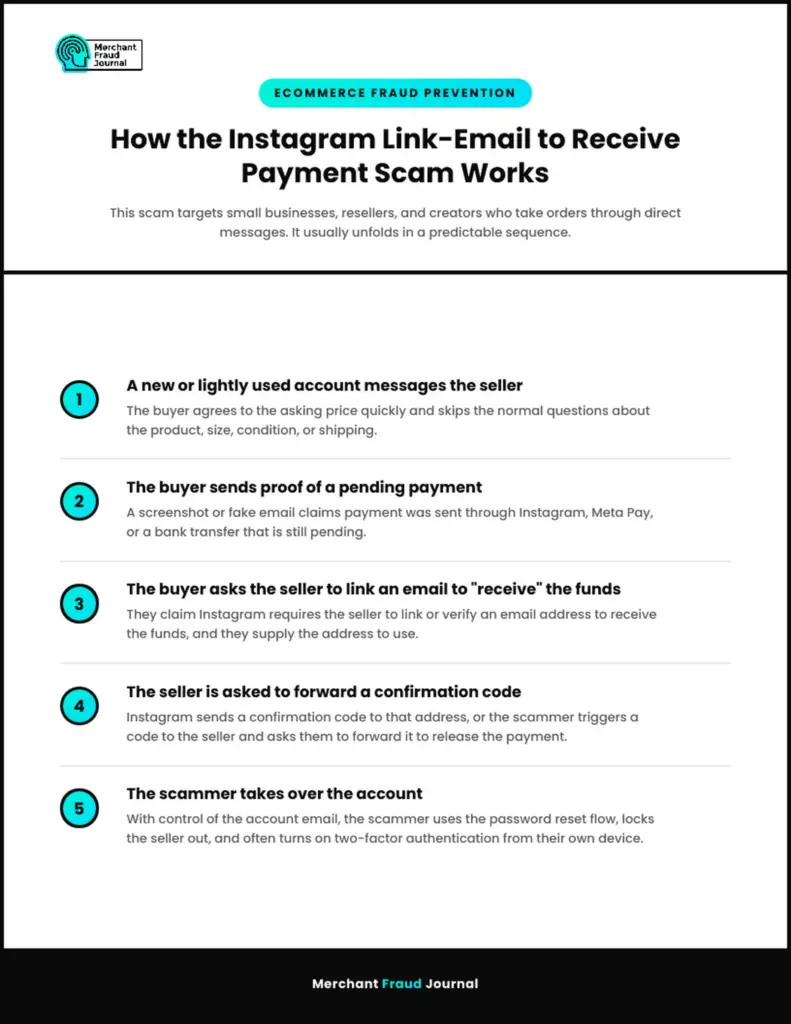
Merchant Fraud Journal infographic titled “How the Instagram Link-Email to Receive Payment Scam Works,” tagged “Ecommerce Fraud Prevention,” subtitled “This scam targets small businesses, resellers, and creators who take orders through direct messages. It usually unfolds in a predictable sequence,” with five numbered steps: 1) A new or lightly used account messages the seller — the buyer agrees to the asking price quickly and skips the normal questions about the product, size, condition, or shipping; 2) The buyer sends proof of a pending payment — a screenshot or fake email claims payment was sent through Instagram, Meta Pay, or a bank transfer that is still pending; 3) The buyer asks the seller to link an email to “receive” the funds — they claim Instagram requires the seller to link or verify an email address to receive the funds, and they supply the address to use; 4) The seller is asked to forward a confirmation code — Instagram sends a confirmation code to that address, or the scammer triggers a code to the seller and asks them to forward it to release the payment; 5) The scammer takes over the account — with control of the account email, the scammer uses the password reset flow, locks the seller out, and often turns on two-factor authentication from their own device.

Variations Sellers Report

Scammers adjust the script to fit the seller and the platform. Watch for these versions of the same trick.

  • A fake Instagram payment email asks you to click a link and log in to accept funds, which leads to a cloned login page built for Instagram phishing.
  • The buyer claims your account must be upgraded to a business account for a fee before the payment can clear.
  • The buyer overpays and asks you to refund the difference before the original payment arrives.
  • A message from a friend’s hacked account asks you to help them receive a payment by adding their email to your profile.

Every variation ends with the scammer controlling your login, your money, or both. The details change, while the request to add an email, share a code, or log in through a link stays the same.

Why Instagram Scams Hit Sellers and Small Businesses Hard

For a business that sells on social media, the Instagram account works as the storefront, the customer list, and often the payment channel. Losing it means losing followers, open orders, and message history in a single step. The risk is growing. The FTC’s 2025 social media scam data shows people reported losing $2.1 billion to scams that started on social media, an eightfold increase since 2020, with Instagram ranking among the top three platforms for reported losses.

Downstream Fraud From a Hijacked Seller Account

A hijacked seller account becomes a tool for more fraud. Scammers post fake giveaways, advertise products the business will never ship, and ask followers to pay by gift card, crypto, or bank transfer. Customers who pay often file disputes with their bank, and any payments that ran through your connected checkout can turn into chargebacks against your business. This is account takeover fraud with a direct hit to revenue and reputation, and it follows the same pattern as many scams targeting online sellers.

Red Flags of an Instagram Scam Email or DM

Most Instagram scams share a handful of signals that sellers can learn to spot quickly.

  • The buyer insists on paying before asking about the product, size, condition, or shipping.
  • The payment confirmation arrives as a screenshot or as an email from an address outside Instagram’s or Meta’s official domains.
  • You are asked to add, change, or verify an email address that you do not own.
  • Someone asks you to share a code sent by Instagram, Meta, or your email provider.
  • The message adds urgency, such as a warning that the payment will be reversed or your account will be suspended.

A genuine Instagram security email comes from domains such as mail.instagram.com, and you can confirm it inside the app. Open Settings, go to Accounts Center, then Password and security, and check Recent emails to see the security and login emails Instagram sent in the last 14 days. If an Instagram email scam claiming to be from the platform does not appear in that list, Instagram did not send it. The same habits used to spot a phishing scam in your business inbox apply here.

How to Protect Your Instagram Seller Account

A few settings and habits shut down the Instagram link email to receive payment scam and most other Instagram account takeover attempts.

1. Lock Down Account Access

Turn on two-factor authentication with an authentication app instead of SMS, and keep the email on your Instagram account tied to an inbox only your business controls. Protect that inbox with its own strong password and two-factor authentication, since it is the key to every password reset. Review Accounts Center regularly for unfamiliar emails, phone numbers, or logged-in devices.

2. Take Payments Only Through Channels You Control

Accept payment through Instagram checkout where it is available, your own eCommerce store, or a payment processor you already use. Confirm every payment by logging in to that account directly instead of trusting screenshots or emails the buyer sends. Real payment systems never require you to add someone else’s email to your social media account, and the same verification habit protects you across digital wallet payments and other fast payment methods.

3. Set Clear Rules for Your Team

If staff or contractors manage your Instagram, write down a simple rule that nobody adds email addresses, shares codes, or clicks payment links sent in DMs. Give each team member their own access through Meta’s business tools instead of sharing the main login, so one compromised person cannot lock the whole business out.

What to Do If You Fell for the Scam

Speed matters once a scammer has your email or code. Take these steps right away.

  1. Check your original inbox for an Instagram message about an email change, and use the link in it to reverse the change and secure your account.
  2. If you cannot log in, go to instagram.com/hacked and follow the recovery steps for a hacked account.
  3. Change the password on your email account and turn on two-factor authentication there as well.
  4. Warn followers and customers through your website, email list, or other social channels not to pay anyone messaging from your account.
  5. Report the scammer’s profile to Instagram and file a report with the FTC at ReportFraud.ftc.gov.

Save every message, screenshot, and email in case you need to dispute payments or prove ownership of the account later. Meta’s guidance on avoiding scams and phishing covers additional reporting and recovery options.

Keep Your Instagram Storefront Out of Scammers' Hands

The Instagram link email to receive payment scam works because it sounds like a routine step in getting paid. Instagram never asks sellers to add a buyer’s email or share a code to release funds, so treat any such request as an attempted account takeover. Secure your account email, turn on app-based two-factor authentication, confirm payments only inside the systems you control, and give your team clear rules for DMs. Sellers who make these habits standard keep their storefront, their followers, and their revenue out of a scammer’s reach.

Frequently Asked Questions

Does Instagram require you to link your email to receive payment?

No, Instagram does not require sellers to link an email address to receive a payment from a buyer. Any buyer who says otherwise is trying to take over your account.

How do I know if an email is from Instagram and not a scam?

Open the Instagram app, go to Accounts Center, then Password and security, and check Recent emails. If the message is not listed there, Instagram did not send it.

Is security@mail.instagram.com a real email?

Yes, security@mail.instagram.com is a real address Instagram uses for security alerts. Scammers often spoof it, so confirm any message through the Recent emails list in the app before acting on it.

What happens if I add a scammer's email to my Instagram account?

The scammer's email can replace yours as the account contact, which lets them reset your password and lock you out. Check your original inbox for Instagram's email change notice and use it to reverse the change immediately.

Can a scammer take over my Instagram with a verification code?

Yes, a login, password reset, or email confirmation code is often the last thing a scammer needs to take control of an account. Never share a code sent by Instagram or your email provider with anyone.

How do I get my Instagram account back after a scam?

Use the link in Instagram's email change notice if you still have it, or go to instagram.com/hacked and follow the recovery steps. Secure your email account at the same time so the scammer cannot reset your password again.

Picture of Charity Amancio

Charity Amancio

Charity Amancio specializes in SaaS solutions for global eCommerce businesses, including payments and risk management applications. She bridges the gap between technology and merchant needs, offering practical perspectives on the tools shaping eCommerce. Her insights appear regularly in B2B publications covering the digital commerce space.

TweetShareSend
Previous Post

What Is Smishing? How SMS Phishing Puts eCommerce Merchants at Risk

Search:

No Result
View All Result

Our Latest Reports

Fraud Trends Report

Consumer Payments Survey Report

Fraud Prevention Tactics that Enable Exceptional Customer Experience

ATO Fraud In Retail Report

3 Ways a Unified Chargeback Management and Fraud Platform Increases Revenue

Digital Trust And Safety Report: Combating the Evolving Complexities of Payment Fraud

On-Demand Webinars

New Trends in The Payments Ecosystem

Balancing Customer Experience and Fraud Prevention: What’s the Secret?

Stopping Fraud Across the Customer Lifecycle

Addressing Payment Fraud and the Customer Experience in 2022


Quick Navigation

  • Home
  • News
  • Join Us
  • About Us
  • Contact Us
  • Advertise
  • Contribute
  • Privacy Policy

Privacy Policy

Our Privacy Policy
Our Terms of Use

Resources

  • Articles
  • eCommerce Fraud Reports
  • eCommerce Fraud Webinars
  • Associations and Non-Profits
  • Podcasts
  • Vendor Directory
  • Chargeflow – AI Chargeback Management

Featured Vendors

  • Signifyd
  • TransUnion
  • PayRetailers
  • Spotrisk
  • CB-ALERT
  • Chargeflow
  • Corepay
  • AtData
No Result
View All Result
  • About Merchant Fraud Journal
    • Interested in Contributing or Guest Posting to Merchant Fraud Journal?
    • Merchant Fraud Journal Editorial Guidelines
  • Advertise on Merchant Fraud Journal
  • Articles
    • Chargebacks
    • Fraud Prevention
    • Influencer Insights
  • Contact Us
  • Download Addressing Payment Fraud and Customer Experience Report
  • Download Chargebacks Consumer Survey Report 2022
  • Download Evolving Complexities of Payment Fraud Report
  • Download Fraud Prevention Tactics that Enable Exceptional Customer Experiences Report
  • Download Merchant Fraud Journal 2023 Fraud Trends Report
  • Download Merchant Fraud Journal 2024 Fraud Trends Report
  • Download Merchant Fraud Journal Generative AI Fraud Prevention Checklist for SMBs
  • Download Quantifying the Challenge of Friendly Fraud: Your Post-purchase Strategy for the Future
  • Download the 2020 Chargeback and Representment Report
  • Download the 2020 Merchant Fraud Journal Vendor Guide
  • Download the 2021 Fraud Trends Report
  • Download the 2022 Fraud Trends Report
  • Download the 2023 Consumer Payment Trends Report
  • Download the 3 Ways a Unified Chargeback Management and Fraud Platform Increases Revenue Report
  • Download the MFJ 2022 Customer Experience Report
  • Download the MFJ ATO in Retail Report
  • Home
  • Home Elementor
  • Job Dashboard
  • Join The Merchant Fraud Journal Community
  • Merchant Fraud Journal Advertising Agreement
  • Merchant Fraud Journal Advertising Agreement – Signifyd
  • MFJ Fraud Trends Report Giveaway
  • News
  • Post a Job
  • Privacy Policy
  • Resources
    • #9978 (no title)
    • 2020 Chargeback Representment Guide for Merchants
    • 2020 Vendor Guide
    • 2023 Consumer Payments Survey Report
    • 3 Ways a Unified Chargeback Management and Fraud Platform Increases Revenue
    • 8 Fraud Prevention Training and Certifications: A 2026 Guide
    • Addressing Payment Fraud and the Customer Experience in 2022
    • Associations and Non-Profits
    • ATO Fraud In Retail Report
    • Balancing Customer Experience and Fraud Prevention: What’s the Secret?
    • Chargebacks Consumer Survey Report 2022
    • Digital Trust & Safety: Combating the Evolving Complexities of Payment Fraud
    • eCommerce Fraud Reports
    • eCommerce Fraud Webinars
    • Fraud Prevention Tactics that Enable Exceptional Customer Experiences
    • How to Build a Recession Proof Chargeback Prevention Strategy
    • How to Reduce Customer Friction During Holiday Sales Season
    • How to Stop Fraud During the 2022 Holiday Season
    • Jobs Board
    • Merchant Fraud Journal 2023 Fraud Trends Report
    • Merchant Fraud Journal’s Fraud Trends 2020 Report
    • Merchant Fraud Journal’s Generative AI Fraud Prevention Report: A Checklist for SMB Companies
    • Merchant Fraud Journal’s Fraud Trends 2021 Report
    • Merchant Fraud Journal’s Fraud Trends 2022 Report
    • MFJ’s 2022 Customer Experience Report
    • Podcasts
    • Prevent High-Velocity Fraud Attacks During the 2021 Holiday Season
    • Quantifying the Challenge of Friendly Fraud: Your Post-purchase Strategy for the Future
    • Stopping Fraud Across the Customer Lifecycle
    • The surprisingly easy way to secure your payment data, reduce your risk, and win the war on ecommerce fraud
    • Vendor Directory
    • Webinar – Addressing Payment Fraud and the Customer Experience in 2022
    • Webinar – Mitigating Fraud and Risk on the ACH Network
    • Win January Chargeback Disputes
  • Subscribed
  • Terms and Conditions

© 2026 Merchant Fraud Journal

Not enough quota to unlock this post
Unlock left : 0
Are you sure want to cancel subscription?