

Phishing scams trick millions of people every year into handing over passwords, credit card numbers, and personal data to criminals posing as trusted companies. These attacks have evolved far beyond obvious spam emails. Modern phishing campaigns use artificial intelligence (AI) via AI-generated messages, deepfake voice calls, and malicious QR codes that can fool even security-conscious users.
Learn more about how phishing works, the most common attack types you’ll encounter, and the specific steps that protect both individuals and businesses from becoming the next victim.
What Are Phishing Scams?
Phishing scams are a form of social engineering where cybercriminals masquerade as trusted entities, like your bank, an eCommerce platform, a government agency, or even your boss, to trick you into revealing sensitive information. The attacker’s goal is typically to steal login credentials, credit card numbers, or Social Security numbers. Sometimes they want you to download malicious software instead.
What makes phishing effective isn’t technical sophistication. It’s psychology. Attackers rely on urgency, fear, or curiosity to override your better judgment. And it works, especially as email remains the top channel scammers use to reach victims, according to the Federal Trade Commission (FTC) data.
How Phishing Scams Work
Phishing remains the most reported cybercrime in the United States, with the FBI’s IC3 logging 193,407 phishing and spoofing complaints in 2024. Every phishing attack follows a similar pattern, even when the delivery method changes.
First, the attacker crafts a message that looks like it comes from a legitimate source: a bank, retailer, or employer. Next, the message creates urgency: your account is suspended, a payment failed, or a package can’t be delivered. Then you click a link leading to a fake login page or download a malicious file. Finally, the attacker captures your credentials and uses them for unauthorized purchases, account takeover, or sells them on dark web marketplaces.
The whole sequence can happen in seconds. Once attackers have your credentials, they move fast, often within minutes. That’s why fraud prevention (careful link inspection, multi-factor authentication, and quick reporting) matters more than reacting after the fact.
The Most Common Types of Phishing Scams
According to the FBI’s 2025 Internet Crime Report, phishing and spoofing were the most reported cybercrimes last year, with over 191,000 complaints logged. It was more than double the next closest category. Phishing has evolved well beyond basic email scams. Modern attackers use multiple channels and increasingly sophisticated techniques.
| Type | Channel | Common Disguise |
|---|---|---|
| Email phishing | Banks, retailers, streaming services | |
| Spear phishing | Colleagues, vendors, known contacts | |
| Whaling | Board members, legal counsel | |
| Smishing | SMS/Text | Delivery services, banks |
| Vishing | Phone call | Tech support, government agencies |
| Clone phishing | Legitimate senders | |
| Quishing | QR codes | Payment portals, Wi-Fi logins |
| Angler phishing | Social media | Brand support accounts |
1. Email phishing
This is the most widespread form. Attackers send mass emails that appear to come from legitimate companies like banks, streaming services, or retailers. They cast a wide net, knowing even a small percentage of recipients clicking through can yield significant returns.
These messages often rely on urgency: a suspended account, an unpaid invoice, or a limited-time offer designed to short-circuit careful thinking. Look closely at the sender’s actual email address rather than just the display name, since spoofed domains often contain subtle misspellings or extra characters.
2. Spear phishing
Unlike mass campaigns, spear phishing targets specific individuals using personal information, such as your name, employer, recent purchases, or job title. This personalization makes the scam far more convincing.
Attackers typically gather this information from social media profiles, company websites, or previous data breaches before crafting their message. Because the email references real details about your life, it can feel far more legitimate than a generic scam. So pause before acting on any request involving money, credentials, or sensitive files, even from a sender who seems to know you.
3. Whaling
Whaling is spear phishing aimed at high-level executives. Attackers research CEOs, CFOs, and other senior leaders extensively, then craft messages requesting wire transfers or sensitive company data.
Some whaling attempts impersonate a board member or legal counsel to pressure quick action, while others hijack an executive’s actual account through prior credential theft and send requests from within the company itself. Verifying unusual financial requests through a separate communication channel, such as a phone call, can stop these schemes before real money moves.
4. Smishing
SMS phishing, or smishing, uses text messages with malicious links. Common examples include fake delivery notifications and urgent bank alerts about suspicious activity.
Text messages tend to receive faster, less scrutinized responses than emails, which is exactly why attackers favor this channel. A shortened or unfamiliar link inside an unexpected text is often the clearest warning sign, so it’s worth going directly to the retailer’s or bank’s official app or website instead of tapping through.
5. Vishing
Voice phishing involves phone calls from attackers posing as tech support, IRS agents, or bank representatives. AI-generated voice cloning has made vishing attacks increasingly convincing.
Some scammers now spoof caller ID to display a legitimate-looking company or government number, adding another layer of false credibility. If a caller pressures you to act immediately or asks for payment through gift cards or wire transfers, hanging up and calling the organization back using a verified number is the safest response.
6. Clone phishing
Attackers copy a legitimate email you previously received, replace the links or attachments with malicious versions, and resend it from a spoofed address. Because the content looks familiar, victims often click without hesitation.
This tactic works especially well against people who receive frequent, similar-looking messages from the same sender, such as shipping confirmations or software update notices. Checking whether you actually expected a follow-up message, and hovering over links to inspect the true destination, can help catch a cloned email before any damage is done.
7. Quishing
QR code phishing uses malicious QR codes that direct victims to fraudulent websites when scanned. You can’t preview where a QR code leads before scanning, which makes quishing particularly dangerous.
These codes frequently show up on parking meters, restaurant menus, posters, or even printed mailers designed to look official. Many phones display the destination URL briefly before opening it, so taking a moment to read that preview instead of scanning on autopilot goes a long way toward staying safe.
8. Angler phishing
Social media phishing targets customers seeking support. Attackers create fake customer service accounts that respond to complaints with malicious links or requests for account credentials.
Because these fake accounts often reply within minutes of a public complaint, frustrated customers rarely stop to question their legitimacy. Confirming that a support account carries an official verification badge, and never sharing passwords or account numbers through direct message, helps prevent this scam from succeeding.
Phishing Scam Examples
Phishing scams affect anyone regardless of business size or type. In fact, Microsoft remains the most impersonated brand in phishing attempts, accounting for over 43% of brand impersonation attacks in recent tracking. Knowing what phishing attacks look like in practice helps you recognize them when they arrive. The following are real-world phishing scam examples you should be aware of.
Fake bank and payment alerts
You receive an email or text claiming suspicious activity on your account. The message demands immediate login to verify your identity. The link leads to a spoofed banking portal that captures your credentials the moment you enter them.
These messages work because they exploit urgency. A person scanning their phone between meetings rarely stops to check the sender’s actual email address, and that split-second decision is what scammers are counting on. Once credentials are captured, attackers often test them against other financial sites within minutes.
Package delivery scams
Fraudulent shipping notifications from fake FedEx, UPS, USPS, or Amazon accounts claim a package can’t be delivered without address confirmation or a small fee payment.
Timing makes this scam effective. Because so many people expect a package at any given moment, a vague notification about a delivery issue feels plausible rather than suspicious. Plus, the small dollar amount requested (often just a few dollars) is low enough that victims pay without much thought, unaware they’ve just handed over payment card details to a criminal.
Fake invoice and vendor emails
Business email compromise attacks send fake invoices or payment requests appearing to come from legitimate vendors. Accounts payable teams are primary targets, especially around month-end processing.
Attackers do their homework before sending a single email. They research a company’s actual vendors, and mimic real invoice formatting. Sometimes they even reference genuine project names or purchase order numbers pulled from a prior breach or compromised inbox, so the request looks routine instead of like an attack in progress.
Brand impersonation login pages
Phishing sites replicate login pages for Microsoft 365, Google, Netflix, or PayPal with near-perfect accuracy. URLs contain slight misspellings (e.g., microsofft.com, pay-pal.com) that are easy to miss.
How closely would you need to look to catch a single extra letter in a web address? Most people wouldn’t, especially on a small phone screen or when they’re distracted, and that’s precisely the gap these fake pages are designed to exploit. Some versions even include working chat support windows or fake security certificates to further reassure the victim.
CEO and payroll wire fraud
Attackers impersonate executives requesting urgent wire transfers, or HR departments requesting employee direct deposit changes. These attacks often arrive late Friday afternoon when verification is harder.
Pressure and hierarchy do most of the work in this scam. An employee who receives an urgent request that appears to come from a senior executive is often reluctant to question it. They might even hesitate to push back or ask for a phone confirmation, and scammers reinforce that reluctance by emphasizing confidentiality or claiming the executive is unreachable until the transfer is completed.
How to Prevent Phishing Scams
While recognizing the signs of a phishing attempt is essential, prevention works best when it combines awareness with practical safeguards. The following measures address different layers of protection, from individual account security to organization-wide defenses, so that even if one line of defense fails, others remain in place to stop an attack.
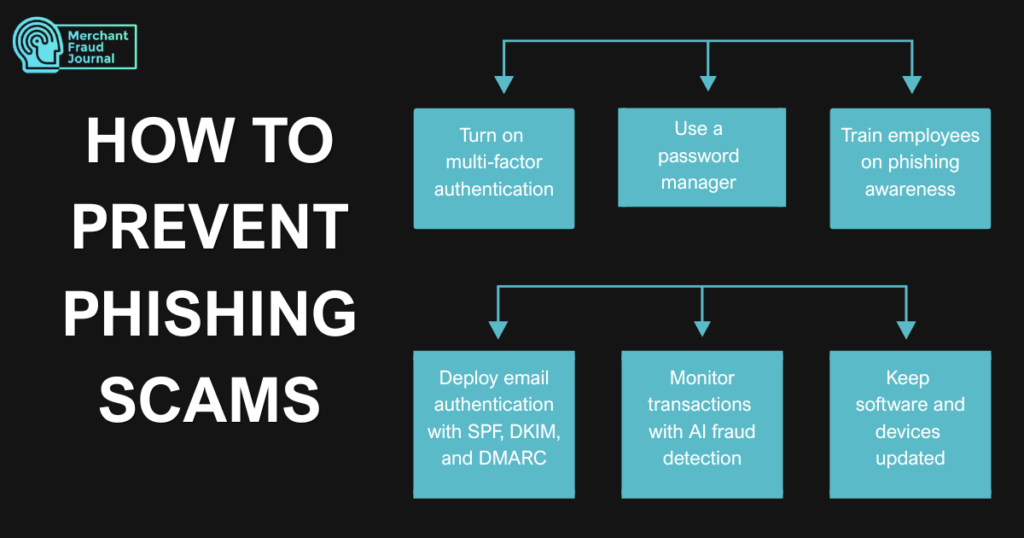
1. Turn on multi-factor authentication
Require a second verification step beyond passwords. Even if credentials are phished, attackers can’t access accounts without the second factor. This simple change blocks the vast majority of account takeover attempts, even when a password has already been compromised. App-based authenticators or hardware security keys offer stronger protection than SMS codes, which can be intercepted through SIM-swapping attacks.
2. Use a password manager
Generate and store unique, complex passwords for every account. This eliminates password reuse, the vulnerability that lets one breach and compromise multiple accounts. Most password managers also alert you when a stored login appears in a known data breach, giving you a chance to change it before attackers can use it. Many tools also flag phishing sites automatically, refusing to autofill credentials on a domain that doesn’t match the saved login.
3. Train employees on phishing awareness
For businesses, regular security awareness training with simulated phishing tests helps staff recognize and report attacks before damage occurs. Reinforcing this training regularly, rather than as a one-time event, keeps employees alert as scam tactics continue to evolve. Establishing a clear, easy reporting process, such as a dedicated button or email alias, also encourages employees to flag suspicious messages instead of ignoring or deleting them.
4. Deploy email authentication with SPF, DKIM, and DMARC
These email security protocols prevent attackers from spoofing your business domain. Together, they make it significantly harder for a fraudulent email to reach an inbox looking like it came from your organization.
- SPF (Sender Policy Framework): Specifies which servers can send email from your domain
- DKIM (DomainKeys Identified Mail): Adds a digital signature to verify email wasn’t altered
- DMARC (Domain-based Message Authentication): Tells receiving servers how to handle emails that fail SPF/DKIM checks
Many organizations configure SPF and DKIM correctly, only to skip DMARC or leave it in monitoring mode indefinitely, which means fraudulent emails still get delivered even though the underlying checks are failing. Moving DMARC to a reject or quarantine policy, once you’ve confirmed legitimate mail sources are properly authenticated, is the step that actually stops spoofed messages from landing in someone’s inbox.
5. Monitor transactions with AI fraud detection
For merchants, real-time transaction monitoring can flag purchases made with stolen credentials before fulfillment. Fraud detection platforms like Chargeflow identify suspicious transactions by analyzing behavioral patterns across a network of 15,000+ merchants. This kind of network-wide visibility often catches fraud patterns that a single merchant would never spot on their own.
6. Keep software and devices updated
Security patches fix vulnerabilities that phishing malware exploits. Enable automatic updates for operating systems, browsers, and security software. Outdated software is one of the easiest entry points for attackers, so staying current closes gaps before they can be exploited.
Strong authentication, informed employees, secure email infrastructure, and up-to-date systems each address a different weak point that attackers try to exploit. Combining technical controls with ongoing awareness allows individuals and businesses to significantly reduce their risk and respond quickly when new threats emerge.
Staying One Step Ahead of the Next Attack
Phishing scams will keep evolving, but the fundamentals of protecting yourself rarely change. Recognizing the tactics attackers use, from urgent emails to cloned messages to convincing voice calls, gives you the awareness to pause before reacting. Pairing that awareness with practical safeguards like multi-factor authentication, password managers, and up-to-date software creates layers of protection that make it far harder for any single scam to succeed.
Frequently Asked Questions
What are the four main types of phishing attacks?
The four primary types are email phishing (mass fraudulent emails), spear phishing (targeted attacks using personal information), smishing (SMS text message phishing), and vishing (voice call phishing). Attackers constantly develop new variations like quishing and angler phishing.
What are the latest phishing scams to watch for?
Current trends include QR code phishing in public spaces and emails, AI-generated deepfake voice calls impersonating executives, and sophisticated business email compromise attacks targeting remote workers.
How is phishing different from spoofing?
Spoofing is the technical method of disguising communication to appear from a trusted source, such as faking an email address or phone number. Phishing is the broader scam that often uses spoofing as a tactic. Spoofing is the tool; phishing is the crime.

Charity Amancio
Charity Amancio specializes in SaaS solutions for global eCommerce businesses, including payments and risk management applications. She bridges the gap between technology and merchant needs, offering practical perspectives on the tools shaping eCommerce. Her insights appear regularly in B2B publications covering the digital commerce space.
