

The way to handle customer identity verification at checkout without losing sales is to verify most buyers invisibly and add friction only when an order looks risky. Passive signals such as device data, billing address checks, and purchase history let a risk engine clear the majority of good customers in the background.
Orders that score as risky get a step-up check, usually a 3D Secure challenge or a one-time passcode, and only the small share that still looks suspicious goes to manual review or a decline. Merchants who apply the same checks to every order either let fraud through or turn away customers they wanted to keep, so the real work is setting those risk tiers and measuring them.
Why Customer Identity Verification Is a Conversion Problem
Every verification step sits between a customer and a completed order, so each one carries a cost. Baymard Institute’s cart abandonment research puts the average documented cart abandonment rate at 70.22%, based on 50 studies (list last updated September 22, 2025). Once Baymard sets aside shoppers who were only browsing, 19% of US shoppers say they abandoned because they did not trust the site with their card details, 17% left over a long or complicated checkout, and 10% abandoned after their card was declined.
Those numbers cut both ways. Too little verification erodes shopper trust and exposes the store to card-not-present fraud. Too much verification adds steps and declines that push good customers out. Merchant priorities reflect that tension. The 2026 Global eCommerce Payments & Fraud Report from the Merchant Risk Council, Visa Acceptance Solutions, and Verifi (March 2026, 1,278 merchant professionals in 37 countries) found that payment success rate and revenue rank as the top two KPIs out of 14 payment metrics merchants track.
The goal is to match the amount of verification to the risk of each order, so legitimate buyers barely notice it. MFJ’s guide on how to prevent credit card fraud covers the wider set of controls that sit behind checkout.
A Layered Approach to Verify Customer Identity
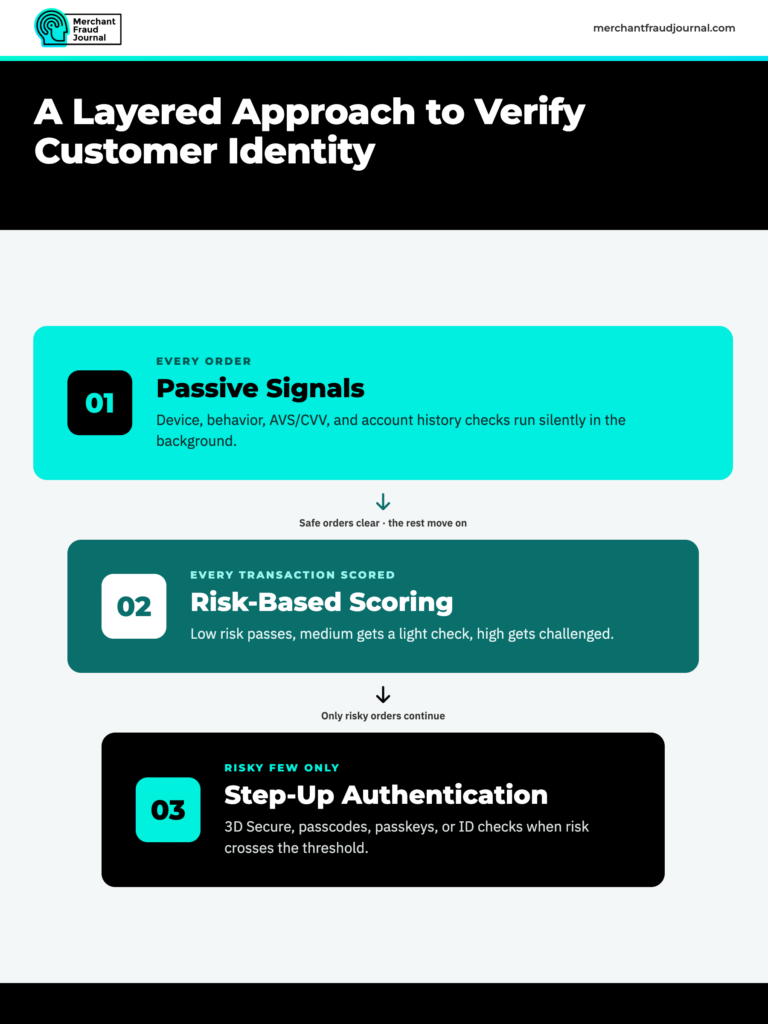
The most reliable way to verify customer identity without adding friction is to stack checks in layers. Each layer clears the orders it can judge confidently and passes the rest to the next, stricter layer.
Layer 1: Passive Signals That Run on Every Order
Passive checks run in the background while the customer fills in the checkout form. They cost the shopper nothing, which is why they belong to every order.
Device fingerprinting and behavioral data
Device fingerprinting builds an identifier from browser and device attributes such as operating system, screen size, time zone, and language settings. It lets the store recognize a returning device, spot one device cycling through many cards, or flag a session hidden behind an emulator or proxy. Behavioral data adds how the customer types, pastes, and moves through the page, which helps separate a real shopper from a script.
Address verification service and CVV checks
The address verification service (AVS) compares the numeric parts of the billing address with what the issuing bank has on file, and the CVV check confirms the shopper has the security code from the card. Both are standard and invisible to the customer. AVS was built mainly for US cards, so a mismatch should raise a risk score rather than trigger an automatic decline.
Account, email, and order history
A customer with a long account history, a consistent shipping address, and past orders that were never disputed is a low-risk buyer. Email age, phone number validity, and whether the shipping address matches previous orders add more context at no cost to the shopper.
Layer 2: Risk-Based Authentication and Scoring
Risk-based authentication turns those passive signals into a score for each transaction. Low-risk orders go straight to authorization, medium-risk orders get a light check, and high-risk orders get a stronger challenge or a manual review. The thresholds should reflect the merchant’s own fraud history, product mix, and margins rather than a vendor’s default settings, and the team should revisit them as fraud patterns change, especially in high-risk transactions.
Layer 3: Step-Up Authentication for Risky Orders
Step-up authentication asks the customer to prove who they are only after the risk score crosses a set threshold. Used this way, friction lands on a small share of orders instead of the whole customer base.
3D Secure challenges
A 3D Secure challenge hands authentication to the card issuer, which may ask the cardholder to approve the payment in a banking app, enter a one-time passcode, or pass a biometric check. For authenticated transactions, liability for fraud chargebacks generally shifts from the merchant to the issuer, though the rules vary by card network and region. Disputes that still come through can be handled with help from the top chargeback protection companies.
One-time passcodes and passkeys
For logged-in customers, a one-time passcode sent to a verified phone or email, or a passkey stored on the customer’s device, confirms account ownership without touching the payment card. These checks fit cases where the risk comes from the account itself, such as a password reset followed by a new shipping address.
Document and selfie checks
Government ID scans matched against a live selfie give the highest confidence, but they also add the most friction. Reserve them for age-restricted goods, very high-value orders, and account recovery rather than routine purchases.
Comparing Verification Methods by Friction and Coverage
Each customer identity verification method answers a different question about the buyer. The table below shows what each one checks, how much friction it adds, and where it fits.
Verification methods reference
| Method | What it verifies | Friction for the customer | Best use |
|---|---|---|---|
| Address verification service (AVS) | Billing address matches issuer records | None | Baseline signal on every card order |
| Card Verification Value (CVV) check | Shopper has the card's security code | Low (one form field) | Every card order |
| Device fingerprinting | Device and browser are consistent and not masked | None | Every order, especially repeat customers |
| 3D Secure frictionless flow | Issuer approves using shared transaction and device data | None | Most card orders where 3DS is supported |
| 3D Secure challenge | Cardholder confirms with the issuer (app, passcode, or biometric) | Medium | High-risk orders or where regulation requires it |
| One-time passcode or passkey | Customer controls the account's phone, email, or device | Low to medium | Logged-in accounts with risky changes |
| ID document and selfie check | Person matches a government-issued ID | High | Age-restricted goods, high-value orders, account recovery |
A practical checkout runs the zero-friction methods on every order and saves the medium- and high-friction methods for orders that earn them. This way, your post-purchase fraud prevention tactics need not take too much weight and be built as a precaution rather than a full-blown damage control solution.
How 3D Secure 2 Keeps Most Customers in the Frictionless Flow
Many merchants still associate 3D Secure with the password pop-ups of the original protocol, which drove shoppers away. EMV 3D Secure, often called 3DS2, works differently, and it is now one of the most useful customer identity verification tools available at checkout.
EMVCo’s EMV 3-D Secure white paper describes a frictionless flow in which the issuer approves a transaction without challenging the cardholder, based on a real-time risk assessment of the transaction details, the cardholder’s history with the merchant, the device used, and technical details such as location or IP address.
That makes frictionless authentication largely a data problem. The more complete and accurate the data a merchant sends, the more confidence the issuer has to approve without a challenge. In practice, that means:
- Sending full device and browser data, account age, and shipping details with every authentication request, not only the minimum required fields.
- Using exemptions or data-only flows where the merchant’s acquirer and region allow them, so low-risk orders skip the challenge entirely.
- Monitoring challenge rates by issuer and card type to see where customers are stopped most often.
- Testing the challenge window on mobile, where a broken redirect or slow app handoff costs the most sales.
EMVCo also highlights two newer features, Trust Lists and Device Binding, which let cardholders mark a merchant as trusted or link their device to their card so repeat purchases face fewer challenges.
Common Mistakes That Hurt Checkout Conversion
Applying the Same Checks to Every Order
A single rule set for all customers means either loose checks that miss fraud or strict checks that frustrate loyal buyers. Tiering by risk score addresses both problems with one change.
Hard Declines on AVS Mismatches
Customers move, mistype ZIP codes, and use cards issued abroad. An automatic decline on any AVS mismatch turns those buyers away. Treat a mismatch as one input to the risk score, and send the order to step-up authentication only if other signals also look off.
Forcing Account Creation as a Security Measure
Requiring an account does little to verify identity, since fraudsters can create accounts as easily as anyone else. It also costs sales: Baymard’s research finds that 18% of shoppers who abandon do so because the site wanted them to create an account. Offer guest checkout and rely on device and payment signals instead.
Overlooking Account Takeover Fraud
Logged-in customers often get waved through because they have an account history, and account takeover fraud exploits exactly that trust. Watch for risky changes inside a session, such as a new device, a password reset, or a new shipping address added right before checkout, and trigger a passcode or passkey check when they appear.
How to Measure Whether Verification Is Costing You Sales
Customer identity verification settings need the same tracking as any other checkout change. Review these metrics every month, broken out by risk tier, payment method, and device:
- Checkout conversion rate for each risk tier, so a drop in one tier points to the check that caused it.
- Challenge rate and challenge completion rate for 3D Secure and passcode steps.
- Authorization approval rate and the share of declined customers who retry with another card.
- Fraud chargeback rate, to confirm that lighter checks are not letting more fraud through.
- Manual review volume and the share of reviewed orders that turn out to be legitimate.
When a change lowers the challenge rate without raising the fraud chargeback rate, keep it. When fraud rises, tighten only the tier where it appeared. Any sound eCommerce fraud prevention program depends on this loop, and MFJ’s guides to merchant fraud monitoring steps and top eCommerce fraud protection solutions cover the tools that make it easier to run. The full merchant fraud protection guide pulls these controls together in one place.
Build a Checkout That Verifies Quietly and Steps Up Only When Needed
Merchants can stop most checkout fraud and keep conversion high with the same setup. Run passive checks on every order, score each transaction, and save 3D Secure challenges, passcodes, and ID checks for the orders that score as risky. Send issuers complete data so more customers pass through frictionless, stop declining orders on a single weak signal, and track conversion and fraud by risk tier each month.
Start with an audit of the checks you run today: list every step a customer sees, note which orders trigger it, and remove or re-tier any step that applies to everyone without a clear fraud reason.
Frequently Asked Questions
How do you verify a customer's identity online?
Most online stores verify a customer's identity with passive checks such as AVS, CVV, device fingerprinting, and account history, then add a 3D Secure challenge or one-time passcode when an order looks risky. ID document and selfie checks are usually reserved for regulated or high-value purchases.
What tools can verify customer identity at checkout?
Common tools include address verification and CVV checks from the payment processor, device fingerprinting and risk scoring from a fraud prevention platform, and 3D Secure authentication through the card issuer. Identity verification providers add ID document and selfie checks for cases that need a higher level of proof.
What is frictionless 3D Secure?
Frictionless 3D Secure is the EMV 3DS flow in which the card issuer approves authentication in the background using transaction, device, and cardholder data, so the customer sees no extra step. The issuer shows a challenge only when its risk assessment flags the transaction.
What is risk-based authentication?
Risk-based authentication scores each login or transaction using signals such as device, location, behavior, and order details, then sets the level of verification to match the risk. Low-risk customers pass without friction, while high-risk ones face extra checks.
What is step-up authentication?
Step-up authentication is an extra verification step, such as a one-time passcode, biometric check, or 3D Secure challenge, that is triggered only when a transaction or session crosses a risk threshold. It keeps strong checks in place for risky activity without adding friction for every customer.
What does 3D Secure authentication failed mean?
It means the card issuer could not confirm the cardholder's identity, either because the customer failed or abandoned the challenge or because the issuer rejected the request. The customer can retry, contact their bank, or pay with another card or payment method.

Charity Amancio
Charity Amancio specializes in SaaS solutions for global eCommerce businesses, including payments and risk management applications. She bridges the gap between technology and merchant needs, offering practical perspectives on the tools shaping eCommerce. Her insights appear regularly in B2B publications covering the digital commerce space.
